
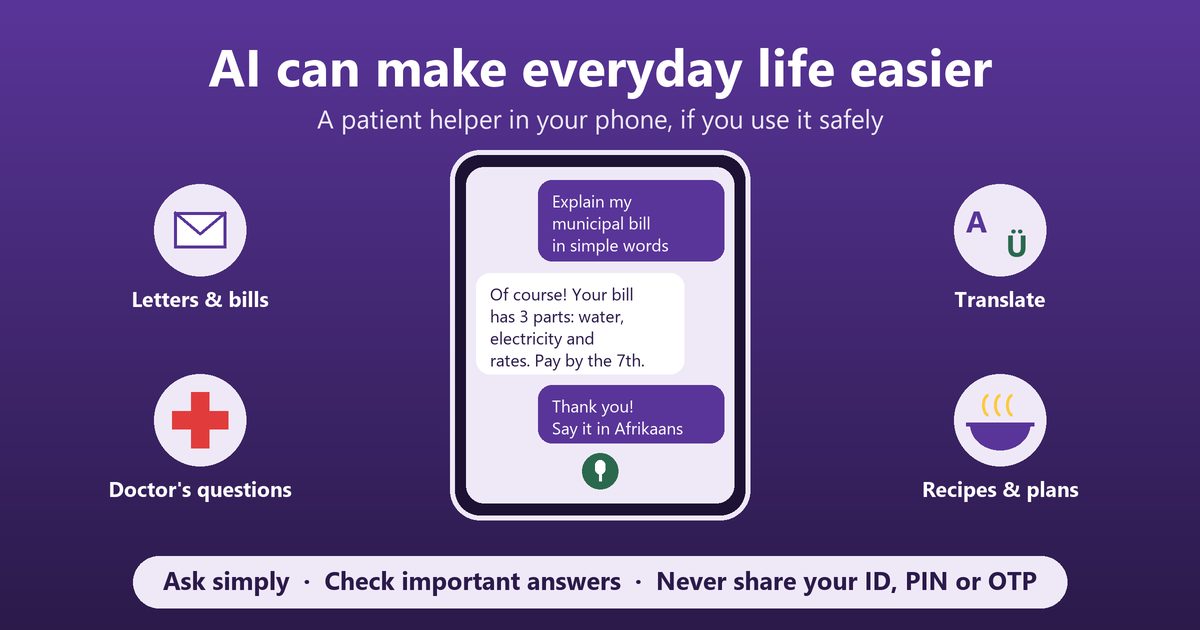
You have probably heard people talking about “AI” or ChatGPT, and perhaps wondered whether it is something for you. It is. Used sensibly, an AI assistant is like having a patient, knowledgeable friend in your phone who never minds being asked the same question twice. Here is how it can make everyday life in South Africa simpler, what to use it for, and what to be careful about.
What is an AI assistant?
An AI assistant is a program you can talk to in ordinary language, by typing or by speaking. You ask a question or describe what you need, and it answers in plain words. The best-known ones all have free versions that work in South Africa:
- Meta AI, built into WhatsApp. If you see a blue-and-purple circle in WhatsApp, you already have it. It is the easiest place to start because you already know how WhatsApp works.
- Google Gemini, on Android phones and in the Google app. It understands Afrikaans and isiZulu as well as English.
- ChatGPT, Microsoft Copilot and Claude, as free apps or on their websites.
Most of them let you tap a microphone and simply speak, and many can read their answers aloud, which is very helpful if your eyesight or typing is not what it used to be.
Ten ways AI can simplify your life
- Understand confusing letters. A municipal account, a medical aid statement, an insurance policy or a letter from SARS. Ask: “Explain this to me in simple words. What do I need to do, and by when?” (Cover or leave out your ID and account numbers first. See the safety rules below.)
- Write difficult letters and emails. A complaint about a wrong electricity bill, a query to your medical aid, or a polite letter to the body corporate. Tell it what happened, and it will draft a clear, polite letter for you to check and send.
- Prepare for the doctor. Ask it to explain a diagnosis or medical term in plain language, or to help you write down questions for your next appointment. Use it to understand, not to diagnose. Your doctor and pharmacist have the final word.
- Read small print. Take a photo of a medicine box, a menu or an appliance label and ask the assistant to read it to you or make it bigger. The free Be My Eyes app does this especially well for people with poor eyesight.
- Translate. Talk to a carer, a builder or a neighbour in Afrikaans, isiZulu or another language, or understand a message from a grandchild who is learning isiXhosa at school.
- Get help with technology. “How do I send a photo on WhatsApp?” or “How do I make the text on my phone bigger?” It will explain step by step, as slowly as you like.
- Plan meals and budgets. “I have chicken, butternut and rice. What can I make for two?” Or ask it to help you set up a simple monthly budget for rising electricity and food costs.
- Organise your days. Make a medication timetable, a packing list for a visit to the children in Cape Town or Johannesburg, or a checklist of things to sort out before you go away.
- Keep your mind active. Ask for a quiz, a crossword clue, bridge tips, the history of St Francis Bay, gardening advice for the coastal Eastern Cape, or help researching your family history.
- Check whether a message is a scam. Copy a suspicious SMS or email (without clicking any links) and ask: “Does this look like a scam?” It is a useful second opinion, but if in doubt, still phone your bank on the number on your card.
How to ask good questions
- Talk to it like a person. Give some background: “I’m 78 and not very good with computers. Please explain simply.”
- Ask for what you want: shorter, simpler, bigger steps, or in Afrikaans.
- Ask follow-up questions. If something is not clear, say so. It will not lose patience.
Important safety rules
- Never share your ID number, bank details, PINs, passwords or OTPs with an AI assistant. What you type may be stored and read by the company that runs it.
- AI can be confidently wrong. It sometimes makes up facts that sound completely believable. Always check anything important about your health, money or legal matters with a real professional.
- Don’t let AI make money decisions for you. Adverts for “AI trading” apps or investments that promise guaranteed returns are scams. SABRIC, the banks’ crime information centre, warns that criminals now use AI to create fake banking apps, fake reviews and even fake videos of well-known people.
- Beware of cloned voices. Criminals can now copy a person’s voice from a short recording and phone you pretending to be your child or grandchild in trouble. Agree on a family code word, and if a call asks for money, hang up and phone the person back on the number you know.
- Only download apps from the official Google Play or Apple App Store, never from a link in a WhatsApp, SMS or email.
- Use it as a helper, not a replacement for people. It is wonderful for answering questions, but it is no substitute for a visit, a phone call or a cup of tea with a friend.
For more on staying safe, read our article on scam emails and phone calls.
Helping a parent or friend get started
Sit down together and start with just one assistant, ideally Meta AI in WhatsApp because it is already familiar. Try three real questions from their own life, such as a recipe, a letter they have been putting off, and a question about their phone. Show them the microphone button. Then write the safety rules above on a card next to the phone.
We can help
Would you like someone to set up an AI assistant on your phone, tablet or computer and show you how to use it safely? Ana Maria, known in St Francis Bay and Humansdorp as The Computer Lady, offers patient one-on-one help at your own pace, at home or in the office.
Please contact Ana Maria or Carlos at info@racomp.co.za or +27 83 225 8563.
References
- Stuff South Africa: WhatsApp’s Meta AI chatbot has made it into South Africa
- Google: Gemini mobile app availability and languages
- ITWeb: Google adds African languages to AI search tools
- Be My Eyes: free help for people who are blind or have low vision
- SABRIC: AI scammers are fooling South Africans: here’s how to stay safe
- Daily Maverick: AI-powered scams drain bank accounts: here’s how to protect your money
- ITWeb: AI-driven identity fraud supercharges emergency scam threat
Leave a Reply